Before Install
Things you should know about the installation process.
During the installation process, the following will happen:
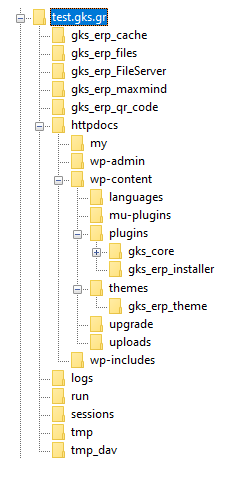
- In the WordPress public folder (usually httpdocs), a folder named my will be created, containing various PHP, JS, CSS, PNG, JPG, and other files.
- The gks_core plugin will be installed.
- The mu-plugin gks_core_plugin_mu.php will be installed.
- The gks_erp_theme theme will be installed
- The following folders will be created in the parent WordPress installation directory:
- gks_erp_cache
- gks_erp_files
- gks_erp_FileServer
- gks_erp_maxmind
- gks_erp_qr_code
- tmp
- tmp_dav
- Over 500 tables with the prefix gks_ will be created in the database.
- Some new fields will be added to the users table.
- Three triggers will be added to the usermeta table